

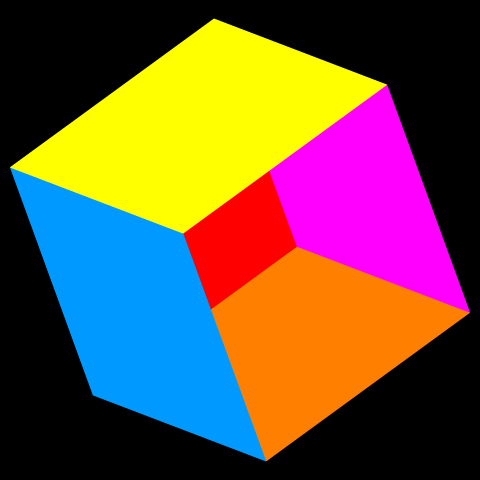
遠近感がない平行投影で立方体の投影図を描きます。
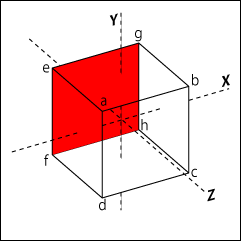
立方体の各頂点の座標を配列で用意します。
頂点4つを組にして面を作り、配列からその座標を取り出します。
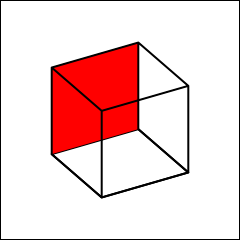
回転変形をして描画します。
背面のみを赤にして、前後関係を分かりやすくしています。
1 2 3 4 5 6 7 8 9 10 11 12 13 14 15 16 17 18 19 20 21 22 23 24 25 26 27 28 29 30 31 32 33 34 35 36 37 38 39 40 41 42 43 44 45 46 47 48 49 50 51 52 53 54 55 56 57 58 59 60 61 62 63 64 65 66 67 68 69 70 71 72 73 74 75 76 77 78 79 80 81 82 83 84 85 86 87 88 89 90 91 | %!PS-Adobe-3.0 EPSF-3.0 %%BoundingBox: 0 0 240 240 %%Title:立方体の投影 /yr 30 def % Y軸周りの回転角度 /xr 10 def % X軸周りの回転角度 /zr 20 def % Z軸周りの回転角度 % 回転と描画プロシージャ /rotation { /sw exch def % 始点を置くかどうかを取得 % Y軸周りの回転 /x2 x1 yr cos mul z1 yr sin mul sub def /y2 y1 def /z2 x1 yr sin mul z1 yr cos mul add def % X軸周りの回転 /x3 x2 def /y3 z2 xr sin mul y2 xr cos mul add def /z3 z2 zr cos mul y2 xr sin mul sub def % Z軸周りの回転 /x4 y3 zr sin mul x3 zr cos mul add def /y4 y3 zr cos mul x3 zr sin mul sub def % 0なら始点、1なら線を引く、それ以外は線を引いた後、始点と線を繋ぐ sw 0 eq { x4 y4 moveto } { sw 1 eq { x4 y4 lineto } { x4 y4 lineto closepath } ifelse } ifelse } def % 立方体の頂点の座標 /a [-50 50 50 ] def /b [ 50 50 50 ] def /c [ 50 -50 50 ] def /d [-50 -50 50 ] def /e [-50 50 -50 ] def /f [-50 -50 -50 ] def /g [ 50 50 -50 ] def /h [ 50 -50 -50 ] def % 座標データを取得 /readdata { % 立方体の配列からデータを取り出し、それぞれの座標に入れる /po exch def % 座標の配列名を取得 /x1 po 0 get def /y1 po 1 get def /z1 po 2 get def } def 2 setlinewidth % 線幅2ポイント 1 setlinejoin 0 0 240 240 rectstroke % 黒枠 120 120 translate % 座標の原点を中央に移動 newpath % 底面 d readdata % 座標のポイント名を渡す 0 rotation % 始点か線を引くか(0 or 1 or 2)を渡し、回転して描画する c readdata 1 rotation h readdata 1 rotation f readdata 2 rotation 0 0 0 setrgbcolor stroke % 色設定 % 奥面(赤) e readdata 0 rotation g readdata 1 rotation h readdata 1 rotation f readdata 2 rotation 1 0 0 setrgbcolor fill % 左側面 a readdata 0 rotation e readdata 1 rotation f readdata 1 rotation d readdata 2 rotation 0 0 0 setrgbcolor stroke % 右側面 g readdata 0 rotation b readdata 1 rotation c readdata 1 rotation h readdata 2 rotation stroke % 上面 a readdata 0 rotation b readdata 1 rotation g readdata 1 rotation e readdata 2 rotation stroke % 正面 a readdata 0 rotation b readdata 1 rotation c readdata 1 rotation d readdata 2 rotation stroke |
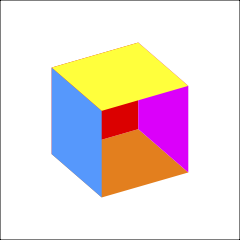
面に色をつけました。奥面と底面を見せるため正面は抜いてあります。
PostScriptは色紙が重なっているようなものなので、面の描画に順番があります。
角度によっては面の見え方に不具合が生じます。
どの角度から見ても良いようにするには、陰面処理をしなければなりませんが、このプログラムでは各頂点間を直線で結んでいるため不可能です。
1 2 3 4 5 6 7 8 9 10 11 12 13 14 15 16 17 18 19 20 21 22 23 24 25 26 27 28 29 30 31 32 33 34 35 36 37 38 39 40 41 42 43 44 45 46 47 48 49 50 51 52 53 54 55 56 57 58 59 60 61 62 63 64 65 66 67 68 69 70 71 72 73 74 75 76 77 78 79 80 81 82 83 84 85 86 87 88 | %!PS-Adobe-3.0 EPSF-3.0 %%BoundingBox: 0 0 240 240 %%Title:回転立方体 /yr -30 def % Y軸周りの回転角度 /xr -30 def % X軸周りの回転角度 /zr 0 def % Z軸周りの回転角度 % 回転と描画プロシージャ /rotation { /sw exch def % 始点を置くかどうかを取得 % Y軸周りの回転 /x2 x1 yr cos mul z1 yr sin mul sub def /y2 y1 def /z2 x1 yr sin mul z1 yr cos mul add def % X軸周りの回転 /x3 x2 def /y3 z2 xr sin mul y2 xr cos mul add def /z3 z2 zr cos mul y2 xr sin mul sub def % Z軸周りの回転 /x4 y3 zr sin mul x3 zr cos mul add def /y4 y3 zr cos mul x3 zr sin mul sub def % 0なら始点、1なら線を引く、それ以外は線を引いた後、始点と線を繋ぐ sw 0 eq { x4 y4 moveto } { sw 1 eq { x4 y4 lineto } { x4 y4 lineto closepath } ifelse } ifelse } def % 立方体の座標 /a [-50 50 50 ] def /b [ 50 50 50 ] def /c [ 50 -50 50 ] def /d [-50 -50 50 ] def /e [-50 50 -50 ] def /f [-50 -50 -50 ] def /g [ 50 50 -50 ] def /h [ 50 -50 -50 ] def % 座標データを取得 /readdata { % ポイントの配列からデータを取り出し、それぞれの座標に入れる /po exch def % 座標の配列名を取得 /x1 po 0 get def /y1 po 1 get def /z1 po 2 get def } def 0 0 240 240 rectstroke % 黒背景 120 120 translate % 座標の原点を中央に移動 newpath % 底面(オレンジ) d readdata % 座標のポイント名を渡す 0 rotation % 始点か線を引くか(0 or 1)を渡し、回転して描画する c readdata 1 rotation h readdata 1 rotation f readdata 2 rotation 1 .5 0 setrgbcolor fill % 色設定 % 奥面(赤) e readdata 0 rotation g readdata 1 rotation h readdata 1 rotation f readdata 2 rotation 1 0 0 setrgbcolor fill % 左側面(青) a readdata 0 rotation e readdata 1 rotation f readdata 1 rotation d readdata 2 rotation 0 .6 1 setrgbcolor fill % 右側面 g readdata 0 rotation b readdata 1 rotation c readdata 1 rotation h readdata 2 rotation 1 0 1 setrgbcolor fill % 上面(黄) a readdata 0 rotation b readdata 1 rotation g readdata 1 rotation e readdata 2 rotation 1 1 0 setrgbcolor fill % 正面(紫) %a readdata 0 rotation %b readdata 1 rotation %c readdata 1 rotation %d readdata 2 rotation %.8 0 .8 setrgbcolor fill |

角度によって面が破綻しています。
コメント